


Dragon Con
3.5421.00 Reviews
App Specs
- Version
- 10.4.1.7
- Updated On
- License
- Free
- Downloads
- 100,000+
- Developer
- Core-apps
- Categories
- Books & Reference
- Platform
- Android
Screenshots

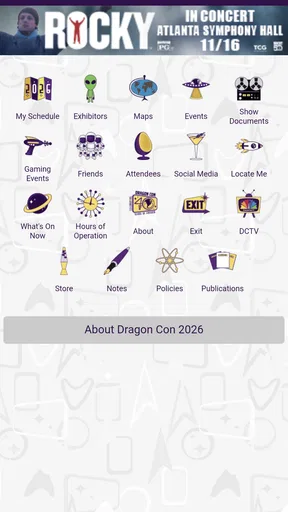
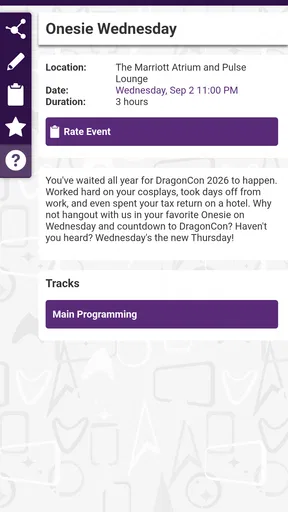
 Analysis by AppCompare
Dragon Con is the kind of app I would install before attending the convention, not because it replaces every other planning tool, but because it puts the event’s information and updates in one place. I reviewed it as a free Books & Reference app from Core-apps, and its purpose is refreshingly focused: help people keep up with Dragon Con rather than trying to become a general social network, entertainment app, or travel planner.
That focus is useful, but it also sets the right expectations. This is an event companion for information and updates. It is not the best choice if you want a complete trip organizer, a universal map app, or a permanent archive of everything you need after the convention. I found its value depends heavily on when I use it, how carefully I check the event information, and whether I keep a backup plan for details that matter in a crowded, fast-moving convention environment.
Using Dragon Con without getting stuck
The first point where I would expect users to hesitate is immediately after installation. The app’s store summary is brief, and that can make the first screen feel less self-explanatory than a modern all-purpose event platform. I would not judge it too quickly if the opening view seems quiet or if the information does not look useful outside the convention period. An event app naturally becomes more valuable as the event approaches and as new information is published.
My first practical step would be to open it while connected to a reliable network and give the initial content time to appear. I would then look through the main information areas before trying to use the app in a hurry. That simple check matters because a convention app is easiest to trust when I have already seen how its navigation works, rather than discovering the layout while walking between crowded venues.
Dragon Con is free, which removes the biggest barrier to trying it. It is also rated for Everyone, so its intended audience is broad. The app has been available since July 18, 2014, and the current version is 10.4.1.7. Those details suggest a long-running event companion rather than a newly launched experiment, but they do not mean every device will behave identically. I would still test it on the phone I plan to carry during the convention.
The Android requirement is version 8.0 or later. That is helpful for people using older phones, although compatibility on paper is only the beginning of a good experience. Storage pressure, an outdated system component, an unstable connection, or aggressive battery management can all make an information app appear unreliable. Before blaming the app, I would check those ordinary causes first.
Small checks that make the first session easier
I would begin by confirming that the phone has enough free space for normal app operation and that the operating system is not waiting for a restart. I would also close unusually demanding apps before opening Dragon Con for the first time. This is not a special requirement of the app; it is simply a sensible way to avoid confusing a slow phone with a broken event guide.
Worth Reading Before You Choose

EA SPORTS FC Mobile 26 Is a Bigger Football Game, but It Takes Time

Flipboard Shows What News Apps Must Do Beyond the Feed

Switching to Android Auto Means Rethinking Your Driving Routine

Google Calendar Makes a Crowded Week Easier to Manage

Ludo King Makes the Most of the Minutes Between Plans

Baby Panda World Brings Quick Play to Modern Phones, but Its Game Library Feels Busy
Next, I would browse several sections instead of opening one page and assuming the whole app is empty. Event information is often divided by purpose, so a page that looks sparse may not represent the rest of the content. I would also reopen the app after moving between screens. If the same content loads consistently, I would feel more confident using it during the event.
One useful habit is to inspect the app before leaving home and again after arriving at the convention area. The first visit tells me whether the installation is healthy. The second tells me whether the phone, network, and local conditions are suitable for real use. That two-stage test is more informative than waiting until I am already late for a panel or trying to find a meeting point.
I would not treat the app as my only source for every critical detail. If I have a must-see activity, I would note its name and time somewhere else as well. That could be a personal note or calendar entry, depending on what I already use. The point is not to duplicate everything; it is to protect the few details I would genuinely regret losing if the phone becomes slow, the connection drops, or the schedule changes while I am moving through the convention.
Where the real workflow friction appears
The most likely friction is not installation. It is the difference between reading information calmly and using it under pressure. At home, I can explore at my own pace. At Dragon Con, I may be carrying bags, listening to friends, dealing with noise, and trying to make a decision quickly. An app that feels perfectly adequate on a sofa can feel less convenient when I need one detail in a crowded hallway.
For that reason, I would use the app in two modes. Before the event, I would browse broadly and identify the information that affects my personal plan. During the event, I would use it for targeted checks rather than continuous exploration. This reduces the chance of getting lost in menus and helps conserve attention when the convention itself is already demanding enough.
A second trade-off is freshness. Updates are one of the app’s central reasons to exist, so I would check the relevant information close to the time I need it instead of relying entirely on an old screenshot or memory. At the same time, I would avoid repeatedly refreshing without a reason. If a page does not change, repeated attempts may only waste time and battery while making it harder to tell whether the issue is the app or the network.
When the app seems stuck, I would use a calm recovery sequence: wait briefly, move to a stronger connection if possible, close and reopen the app, and try the same area again. If the problem affects only one screen, I would continue checking other areas rather than assuming the entire installation has failed. If everything is unresponsive, I would restart the phone before considering more disruptive steps.
A safer way to recover important information
I would avoid clearing app data or uninstalling Dragon Con as a first reaction. Those actions can remove locally available information and force me to start over at the worst possible time. A restart and a connection check are less destructive. If an update is available through the app store, installing it may also be sensible, but I would do that before the convention rather than while rushing between activities.
Another practical recovery method is to write down the minimum information needed for the next few hours. I might record a panel title, a location, and a time in a note after checking the app. That does not turn the phone into a full offline copy of the convention, but it gives me a fallback for the decisions I have already made. I find this especially useful when traveling with friends, because it prevents the whole group from depending on one person’s screen at one moment.
If the app opens but the information looks old, I would first compare the display with another current source associated with the convention before concluding that Dragon Con is wrong. Event information can change, and different channels may refresh at different times. The sensible response is to verify the specific detail that matters, not to assume that every page is unusable.
It is also worth separating an app problem from an account or device problem. If the same behavior happens after a restart and on a dependable connection, I would note exactly which screen failed and what I was doing. That makes any support request more useful than simply saying the app does not work. Precise notes can also reveal whether the issue is limited to loading, navigation, or a particular piece of content.
When Dragon Con is not the cause
Convention conditions can make troubleshooting misleading. A crowded venue may produce weak or inconsistent connectivity. A phone in power-saving mode may delay background activity or make switching between screens feel sluggish. Heat, a nearly full battery, and many open apps can create similar symptoms. In those situations, reinstalling an event app may accomplish very little.
I would test the phone with another ordinary app that needs a connection. If several apps are slow, the network or device is the more likely source of trouble. If other apps work normally but one Dragon Con screen repeatedly fails, then the problem is more likely specific to that app or its content. This simple comparison prevents a lot of unnecessary frustration.
The same reasoning applies to missing information. If I cannot find something, I would first check whether I am looking in the right part of the app and whether the event information has been updated recently. I would then confirm the detail through another appropriate convention source if it affects a time-sensitive decision. An event companion can be valuable without being the sole authority for every last-minute change.
Compared with a general web search, the app’s advantage is concentration: I can start with a Dragon Con-specific reference point instead of sorting through unrelated results. Compared with a calendar app, its advantage is context, while the calendar remains better for protecting my personal schedule. Compared with a messaging group, Dragon Con is better for structured reference, while messages may be faster for finding friends. I would use those tools together rather than expecting one of them to handle every task.
Who will get the most from it?
I think Dragon Con is most useful for attendees who want a dedicated place to check convention information and updates without paying for another service. It also suits people who prefer browsing an event-focused app instead of jumping between browser tabs. New visitors may appreciate having a single starting point, while returning attendees may use it as a quick way to confirm details before heading out.
It is less suitable for someone who wants a highly personalized itinerary, detailed trip budgeting, or a complete group coordination system. I would also hesitate to recommend relying on it alone if a user is uncomfortable with basic troubleshooting or has a phone that struggles with newer apps. In those cases, a personal notes system, calendar, and another current information source may provide a more dependable overall plan.
The app’s audience is broad, reflected in its Everyone age rating, but broad accessibility does not guarantee that every user will find the workflow ideal. Someone who enjoys exploring event information will probably be comfortable. Someone who wants every important decision reduced to a single tap may find the experience less direct, especially when the convention is busy.
What the numbers tell me about its position
Dragon Con has an average rating of 3.6 from around 1,200 ratings, alongside 421 written reviews. It has passed 100,000 installs, which is enough to show that it has reached a meaningful audience without suggesting that every attendee uses it. I read that combination as a sign of a useful but imperfect companion: established enough to be worth trying, yet not so universally praised that I would ignore the need for a backup plan.
The rating also fits my practical view. An event app can be excellent at putting relevant information in front of me and still disappoint when loading is slow, navigation feels dated, or the information I need is not where I expect it to be. Those weaknesses matter more during a convention than they would in a relaxed reading app, because the cost of confusion is missed time and unnecessary walking.
Core-apps deserves credit for keeping the product centered on Dragon Con rather than turning it into a generic reference tool. That specialization is its strongest reason to install it. The trade-off is that its usefulness is tied to one event and to the quality of the information available for that event. I would not keep it as a daily reading app once I no longer need Dragon Con updates.
My practical verdict before you install
I would install Dragon Con before attending, open it on my actual event phone, test the main information areas, and decide which details deserve a personal backup. I would not wait until I am standing in a crowded venue. A few minutes of preparation can reveal whether the app feels natural to me and whether my device and connection are ready for it.
My strongest recommendation is to use it as a focused reference companion, not as the entire plan. Check it before setting out, confirm important details near the time they matter, and keep short notes for anything that would be difficult to recover. If a screen fails, try connection and device checks before deleting anything. That workflow gives the app room to be useful without asking it to solve problems it was never designed to solve.
Overall, I see Dragon Con as a worthwhile free download for people attending the convention, especially those who want event-specific information and updates in a dedicated app. Its limitations are real: the experience may require patience, it should not be treated as an infallible offline safety net, and it will not replace calendars, maps, or group messaging. Still, for its intended job, the best approach is to prepare with it early and use it selectively during the event.
If that sounds like the way you plan to attend Dragon Con, I would give it a try. If you only want a universal planner or a tool for everyday reading, I would skip it and use an app built for that broader purpose instead. For convention attendees who value a direct information source and are willing to keep a simple backup, Dragon Con is a sensible companion from Core-apps, and its free price makes testing it a low-risk decision.
Pros
- Excellent way to discover schedules
- guests
- and events in one place.
- Personalized planning helps manage a busy convention itinerary.
- Maps and venue details make navigating Dragon Con easier.
- Useful updates can help attendees track schedule changes.
- Supports a more organized experience for first-time visitors.
Cons
- Large amounts of event information can feel overwhelming at first.
- Some features may be less useful outside the convention dates.
- Indoor location accuracy may vary in crowded convention areas.
- Frequent updates could use noticeable battery and mobile data.
- The app’s usefulness depends heavily on current event information.
FAQs for Dragon Con
What is Dragon Con, and what can I use the app for?
Dragon Con is the official mobile companion for the Dragon Con convention, a large fan event focused on science fiction, fantasy, gaming, comics, anime, film, and pop culture. After installing it, you can browse the event schedule, explore panels and activities, check guest information, review locations, and plan your convention experience more efficiently from your Android or iOS device.
Does the Dragon Con app include the complete convention schedule?
The app is designed to provide access to Dragon Con programming, including panels, workshops, performances, parties, gaming events, and other activities. Availability can depend on the current convention year and official updates, so some details may change before or during the event. It is a good idea to keep the app updated and check announcements for schedule changes or cancellations.
Can I create a personal schedule or save events in the Dragon Con app?
One of the most useful features for attendees is the ability to organize activities that interest them instead of relying only on the full event listing. Depending on the version and event configuration, you may be able to favorite or save panels and receive reminders. This can help prevent missed sessions, especially when several events take place at the same time.
Does the Dragon Con app work without an internet connection?
Some information may remain available after it has been loaded, but you should not assume that every feature works completely offline. Convention schedules, room changes, announcements, maps, and other live information may require an internet connection to refresh. Before arriving, open the app and save important details where possible, while keeping mobile data or reliable Wi-Fi available during the event.
Is the Dragon Con app free, and is it safe to download?
The official Dragon Con app is generally offered as a free download, although attending the convention itself requires registration and may involve separate costs. For safety, install it only through the official Google Play Store or Apple App Store, verify the publisher information, and review requested permissions. Avoid unofficial copies, since they may contain inaccurate schedules, intrusive advertising, or security risks.


